Applies for: iPublisher
Where: Autogen, New job
New job
This article explains how to use the PBT/vPvB substance check feature in iPublisher’s Autogen / New Job dialog. This feature helps ensure compliance with Regulation (EC) No 1907/2006, Annex XIII, by checking product compositions for substances classified as PBT (Persistent, Bioaccumulative, and Toxic) or vPvB (very Persistent and very Bioaccumulative).
Step-by-Step Instructions
1. Enable the PBT/vPvB Check
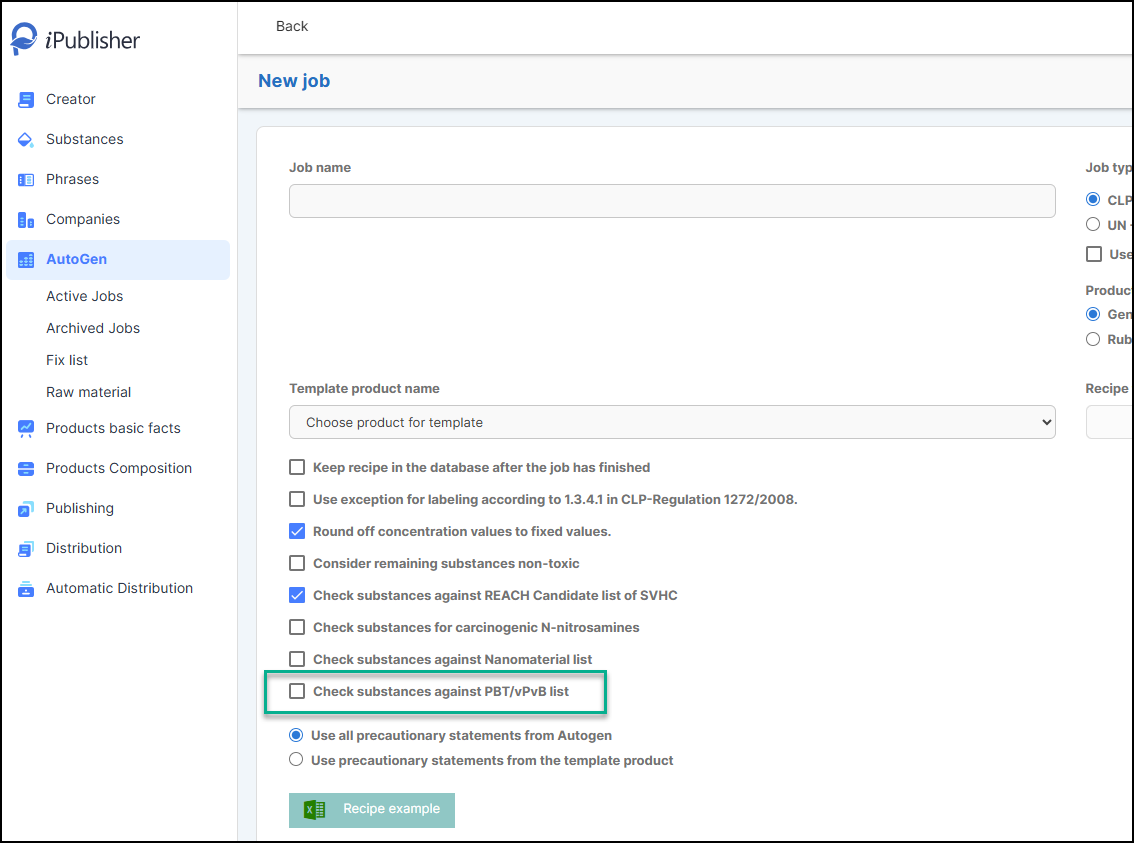
- In the Autogen / New Job dialog, select the checkbox labeled:
- Check substances against PBT/vPvB list
2. What Happens Next?
- When this option is enabled, Autogen will automatically:
- Check all substances in the product composition for PBT/vPvB substances.
3. Results and Automated Phrasing
If no substances match PBT/vPvB criteria:
- The following phrase is added to Section 2.3 and Section 12.5of the generated document:
This product does not contain any substances that meets the criteria for vPvB and PBT according to Regulation (EC) No 1907/2006, Annex XIII.
If one or more substances match PBT or vPvB criteria:
For each matched substance and type (PBT or vPvB), the following phrase is added to Section 2.3 only:
This product contains a substance ([CASNUMBER]) that meets the criteria for [TYPE] according to Regulation (EC) No 1907/2006, Annex XIII.
- [CASNUMBER]: List all relevant CAS numbers, separated by commas if there are multiple.
- [TYPE]: Will be either “PBT” /“vPvB”.