
Creating a recipe for AutoGen
Use the template for the recipe file from AutoGen. You can download the recipe example file by clicking on AutoGen > New Job and then on the ‘Recipe example-button'.
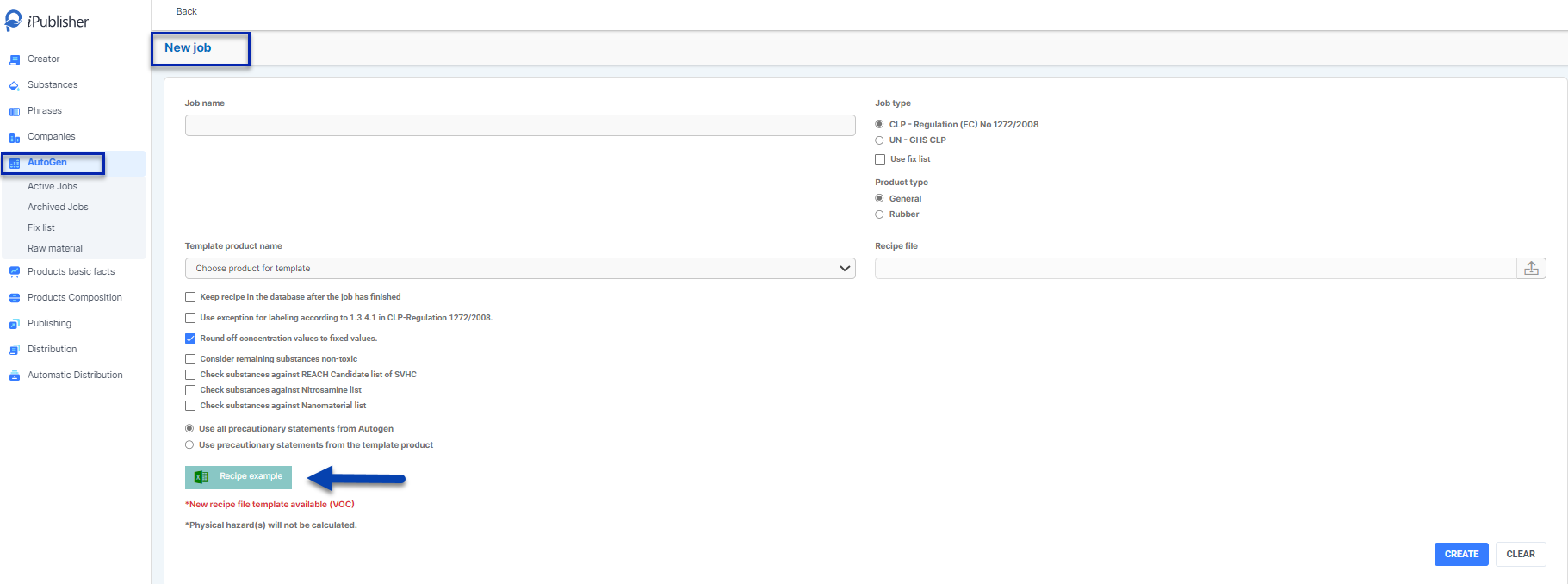
Columns in the recipe file should not be changed, otherwise AutoGen will not be able to use the document.
There are two sheets in the template for entering data ’Product summary’ and ’Raw Material summary’ and two sheets explaining the different columns and mandatory fields.

Product Summary – The section of the Excel file where you enter product information. Product Name is the only mandatory field.

Raw Material summary -This is the sheet where you will enter relevant information about the raw materials.
In the column for ‘Product name’ you need to use the same name that you used in ’Product summary’, so AutoGen will match the raw material number to the product you want to create.
Add your raw material number (See Raw material for more info). Compound(s) concentration(s) (%) does not need to be summed up to 100% for each product created. Summary of raw material(s) concentration(s) can vary from 0-100%.
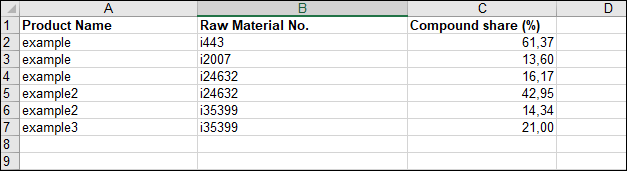
Product Number / Raw Material No.
This is an internal iPublisher number for product identification. It is used if a product will be used as a raw material (AutoGen) or in/by the Automatic Distribution module, it is not a part of SDS content.